BadSeed Tech Carpio is a special edition of the DeltaHub Carpio 2.0, an ergonomic wrist support designed to glide with your hand while using a mouse. It offers a different approach to traditional wrist rests, with a compact design, replaceable pads, and creator-specific styling.
If you spend hours gaming, editing videos, designing, or working at a computer, you may be curious about how this small accessory works. Here is what you should know about its design, sizing, benefits, and limitations before deciding whether it suits your setup.
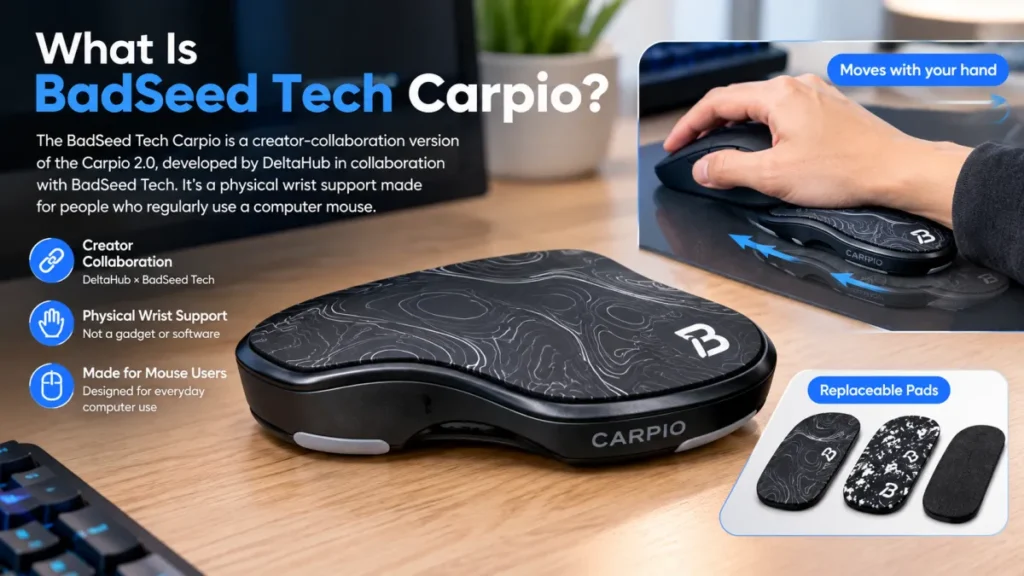
What Is BadSeed Tech Carpio?
The BadSeed Tech Carpio is a creator-collaboration version of the Carpio 2.0, developed by DeltaHub in collaboration with BadSeed Tech. It is not a new electronic gadget or a software product. Instead, it is a physical wrist support made for people who regularly use a computer mouse.
The main difference is its design. Unlike conventional foam or gel wrist rests that remain in one position, the Carpio is designed to move alongside your hand. The BadSeed Tech edition adds distinctive styling and special replaceable pads while retaining the core Carpio 2.0 design.
If you’re interested in macOS security and AI tools, read our guide to macOS Full Disk Access for AI Agents to understand how these permissions work and what they mean for your data privacy.
How Does BadSeed Tech Carpio Work?
The device sits beneath the heel of your palm and moves across a suitable surface as you move your mouse. Its low-friction PTFE gliders help it travel smoothly, while the shaped upper surface provides a place for your palm to rest.
This moving design aims to reduce the feeling of working against a stationary wrist cushion. It can also help some users maintain a more natural relationship between their hand and forearm during mouse movements.
However, comfort depends on your hand position, desk height, mouse grip, and personal preferences. The product should not be considered a guaranteed solution for wrist pain or a medical treatment.
Key Features and Materials
The BadSeed Tech edition uses the same basic construction as the standard Carpio 2.0. Its main components serve different purposes:
- PTFE gliders: Help the support move across compatible desk surfaces.
- ABS base: Provides the device’s rigid structure.
- Silicone pads: Create the contact surface beneath the palm.
- Replaceable pads: Let users change the top pads without replacing the entire accessory.
- Compact design: Takes up less desk space than a full-width keyboard wrist rest.
It does not require batteries, charging, software installation, or a USB connection. Its purpose is straightforward: provide moving palm support during mouse use.
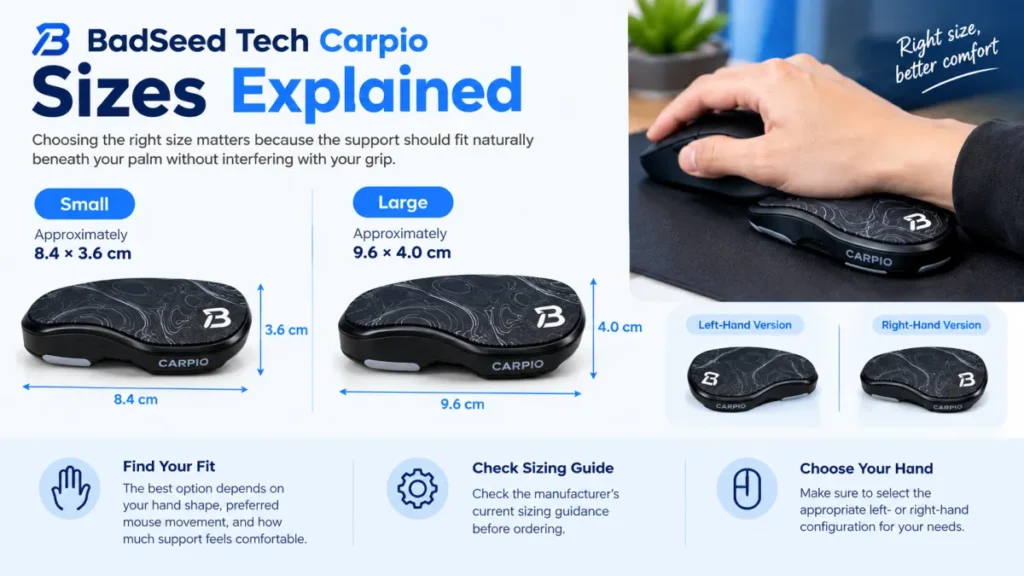
BadSeed Tech Carpio Sizes Explained
Choosing the right size matters because the support should fit naturally beneath your palm without interfering with your grip.
DeltaHub lists two sizes for the Carpio 2.0 platform:
- Small: Approximately 8.4 × 3.6 cm.
- Large: Approximately 9.6 × 4.0 cm.
The best option depends on your hand shape, preferred mouse movement, and how much support feels comfortable. Check the manufacturer’s current sizing guidance before ordering, and select the appropriate left- or right-hand configuration for your needs. The BadSeed Tech Carpio is based on DeltaHub’s Carpio 2.0 design. You can check the official product page for additional product details and availability.
BadSeed Tech Carpio vs. Standard Carpio 2.0
The primary difference is the collaboration design rather than a new ergonomic mechanism. Both versions use the same general gliding-support concept and core platform.
The BadSeed Tech edition is worth considering if you prefer its appearance or want the special collaboration pads. The standard Carpio 2.0 may make more sense if you do not care about creator branding and find it available at a better price.
You should compare the current product listings rather than assume that the special edition offers better performance simply because it has different styling.
Who Should Consider Using It?
The BadSeed Tech Carpio may interest PC gamers, office workers, programmers, students, designers, and video editors who spend considerable time moving a mouse.
It may be particularly useful for someone who dislikes a fixed wrist rest and wants a smaller support that follows their hand.
On the other hand, people who prefer soft, stationary cushioning may not enjoy its movement. It may also be less suitable when the desk surface creates too much friction or the support sits at an uncomfortable height.
Tips for Using the Carpio Correctly
Start by placing the support beneath the heel of your palm rather than directly under the wrist joint. Let it glide naturally instead of pressing down hard or trying to keep it stationary.
Keep your mouse within comfortable reach, support your forearm where practical, and adjust your chair and desk to maintain a relaxed posture. A smooth desk mat can also help the gliders move as intended.
Remember that an ergonomic accessory cannot correct every workstation problem. If you experience persistent pain, numbness, or weakness, seek advice from a qualified healthcare professional.
Is BadSeed Tech Carpio Worth It?
The BadSeed Tech Carpio is best understood as a specialized mouse wrist support, not a completely new technology. Its main appeal is the gliding design, compact size, and collaboration-specific appearance.
Whether it is worth buying depends on how you use your mouse and whether moving palm support feels better than a traditional cushion. Compare the current price, check the sizing guide, and consider your desk surface before making a decision.
For someone who values mobile support and likes the BadSeed Tech design, it may be an option worth exploring. For others, a basic foam wrist rest or the standard Carpio 2.0 could be a more suitable choice.
Pingback: Lenovo ThinkCentre vs IdeaCentre: Which Desktop Is Better for You?
Pingback: TechCrunch Disrupt 2026: Investor Guide to Startups